
Designing a Beginner Mode for AWS EC2
AWS EC2 is powerful, but its launch experience can feel dense for people setting up cloud infrastructure for the first time.
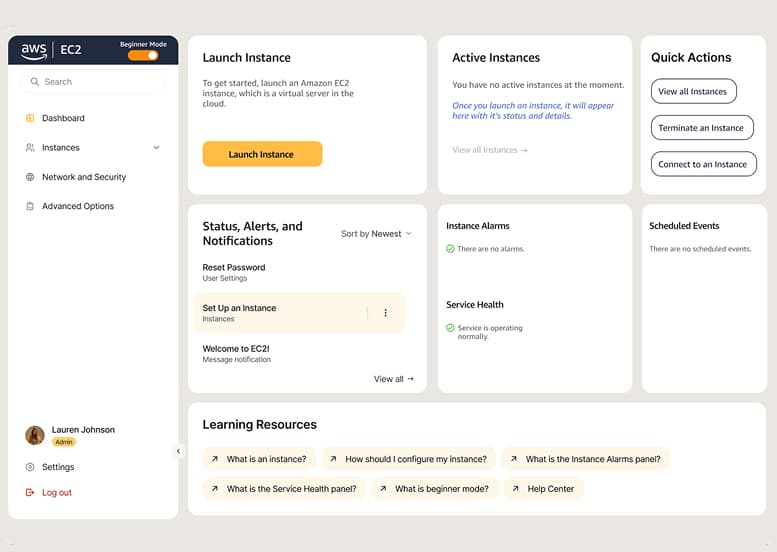
I designed a Beginner Mode concept that makes the setup path clearer, reduces navigation uncertainty, and helps new users launch with more confidence.
01
The Mission
Help new AWS users understand EC2, make confident launch decisions, and complete a successful first setup with less friction.
My Role
Research synthesis, flow redesign, UI direction, prototyping, and usability testing.
Challenge
Dense jargon and unclear entry points made first setup feel risky.
Approach
Optional Beginner Mode with guided templates and simpler navigation.
Outcome
4 of 4participants new to EC2 found the Beginner Mode concept easier to understand than the current flow in moderated prototype testing.
02 Understanding the Problem
First-time EC2 users struggled to find a confident starting point.
Dense terminology, unclear entry points, and high-stakes setup decisions created hesitation before users could experience EC2's value.
Product Context
AWS EC2 lets users create virtual machines in the cloud, but its flexibility can overwhelm first-time users when navigation and terminology feel unfamiliar.
Core Issue
Before users can experience EC2's value, they first need to understand what matters now, which decisions are safe to make, and how to move forward with confidence.
How might we...
Help first-time EC2 users navigate the dashboard and instance setup more confidently by simplifying entry points, reducing jargon, and guiding key decisions without taking away advanced control?
03 Understanding User Needs
Understanding User Needs
To better understand the users and existing challenges in EC2's interface, I reviewed 50+ posts across Reddit and AWS community boards and grouped recurring complaints into themes such as jargon, visual clutter, contrast/readability, and confusing setup flows.
Who I Designed For
I identified two broad EC2 user groups with different needs and tolerance for complexity.
Beginner/New Operator
- Prioritizes confidence and ease of setup over deep configurability.
- Needs reassurance, clearer terminology, and a guided starting point.
- Examples: Students, new professionals, start-up founders, hackathon participants.
Advanced Operator
- Prioritizes speed, control, and direct access to advanced settings.
- Does not want simplified flows to block efficient workflows.
- Examples: Cloud architects, site reliability engineers.
What Community Feedback Revealed
Here are direct quotes that highlighted recurring frustrations around technical jargon, visual clutter, poor contrast, and confusing workflows:
The visuals take up so much d*mn space on your screen compared to what is actually useful information
Color used to draw your eyes to points of action, now it's everywhere. I feel like I can't find anything.
Why is there no simple option? Like — 'Deploy an Instance for me'? As a beginner developer, it is quite hard to ramp up.
Key insights from community research
- 01
Technical jargon and unfamiliar language increase hesitation for new users.
- 02
Both beginners and advanced users benefit from stronger readability and visual hierarchy.
- 03
The Launch Instance flow appeared repeatedly as a high-priority task in the posts reviewed.
04 Defining the Project Scope through UX Audit
Defining the Project Scope through UX Audit
Based on the community research and UX audit, I narrowed the redesign to the two highest-impact surfaces for first-time users: the dashboard and the Launch Instance flow.
Highest Impact Screens and Flows
I prioritized surfaces where users start, make key decisions, and are most likely to hesitate or drop off.
Dashboard
Why is it important?
The dashboard is the first screen many users see, so it shapes whether they can identify a clear starting point or feel lost immediately.
What will change?
Simplify the dashboard by reducing clutter, emphasizing essential actions, and creating a clearer entry point into EC2.
Launch Instance
Why is it important?
Launch Instance appeared repeatedly as a high-priority task and is the point where beginners face the most setup decisions.
What will change?
Simplify setup with guided templates for common use cases, clearer layout and contrast, and less technical jargon.
Beginner Success
A new EC2 user is successful if they can:
Identify where to start from the dashboard.
Begin Launch Instance without second-guessing the entry point.
Complete key setup steps without getting lost in advanced options.
05 Ideation and Wireframing
Ideation and Wireframing
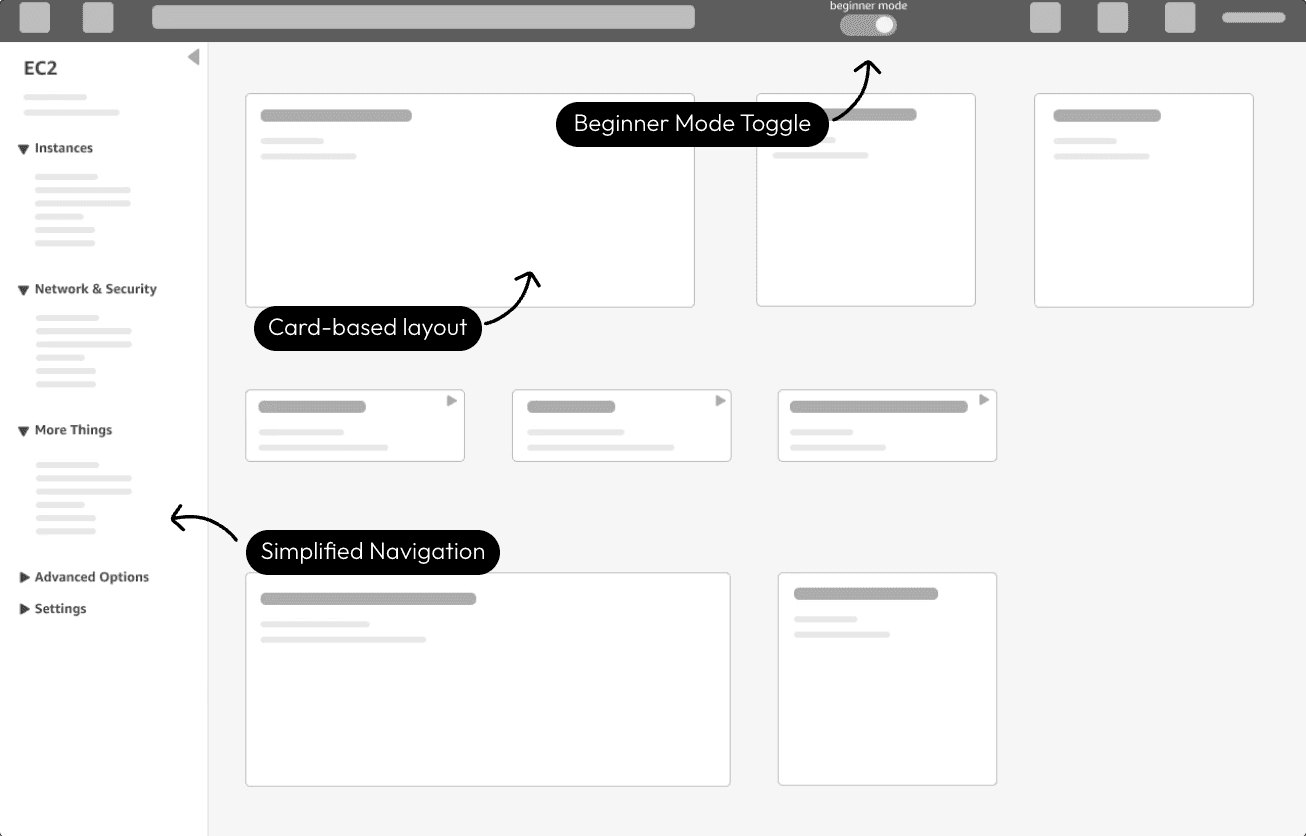
Based on the research and defined scope, I created early wireframes to explore how a simpler dashboard, guided setup, and clearer hierarchy could make EC2 feel more approachable for beginners.
Dashboard Wireframe Exploration
- Beginner Mode toggle: A clear on/off option so first-time users get guidance while advanced users retain control.
- Simplified navigation: Advanced options are tucked away to reduce noise and make the sidebar easier to parse.
- Card-based layout: Core actions are surfaced through larger, clearer modules to improve hierarchy and reduce overwhelm.
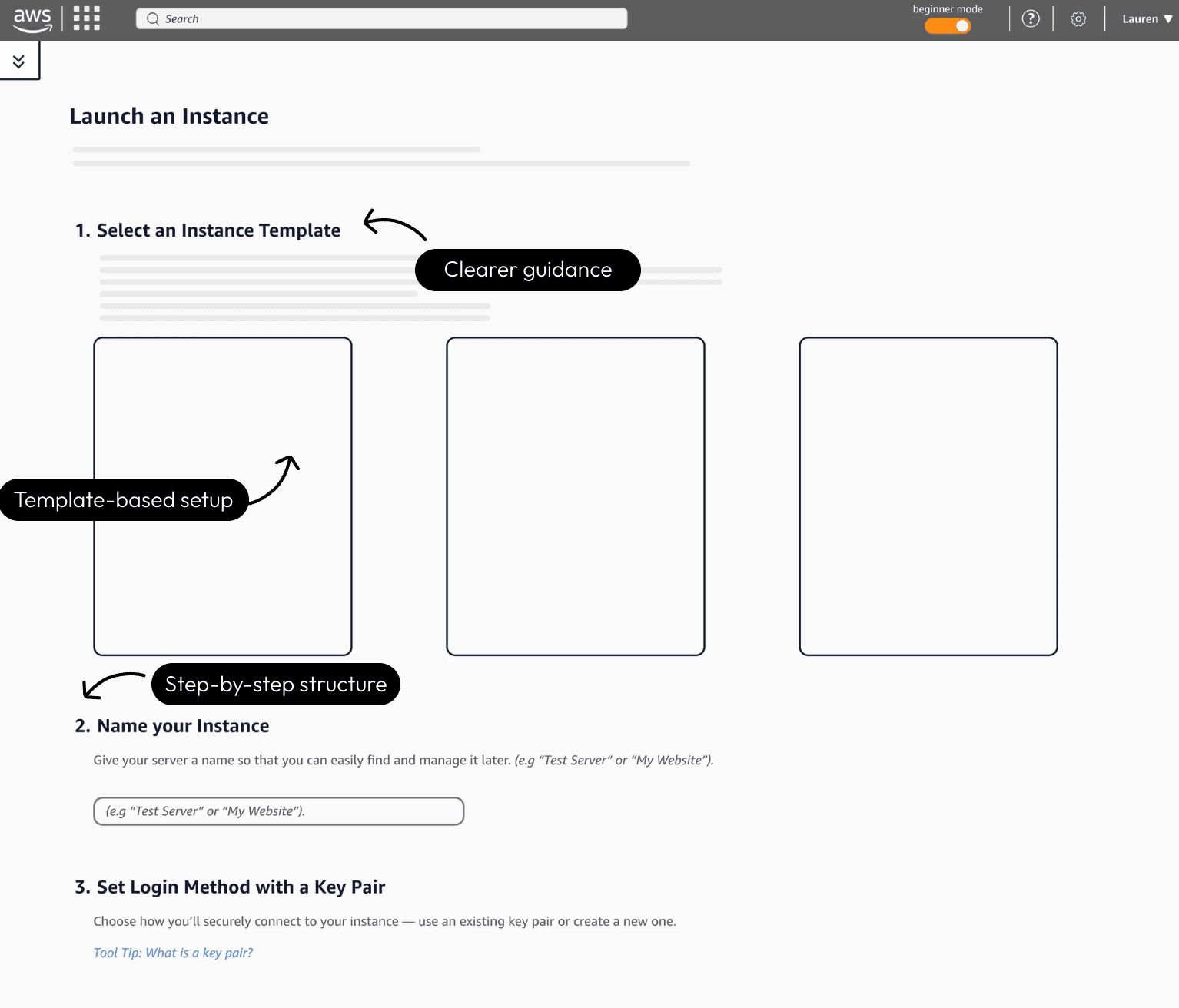
Launch Instance Flow Wireframe Exploration
- Template-based setup: Introduces common starting points so beginners can begin with guided configuration instead of making every decision from scratch.
- Step-by-step structure: Breaks setup into clearer stages so users can focus on one decision at a time.
- Simplified language and guidance: Uses clearer labels and helper text to reduce confusion around technical terms and setup choices.
06 Visual Design
Visual Design
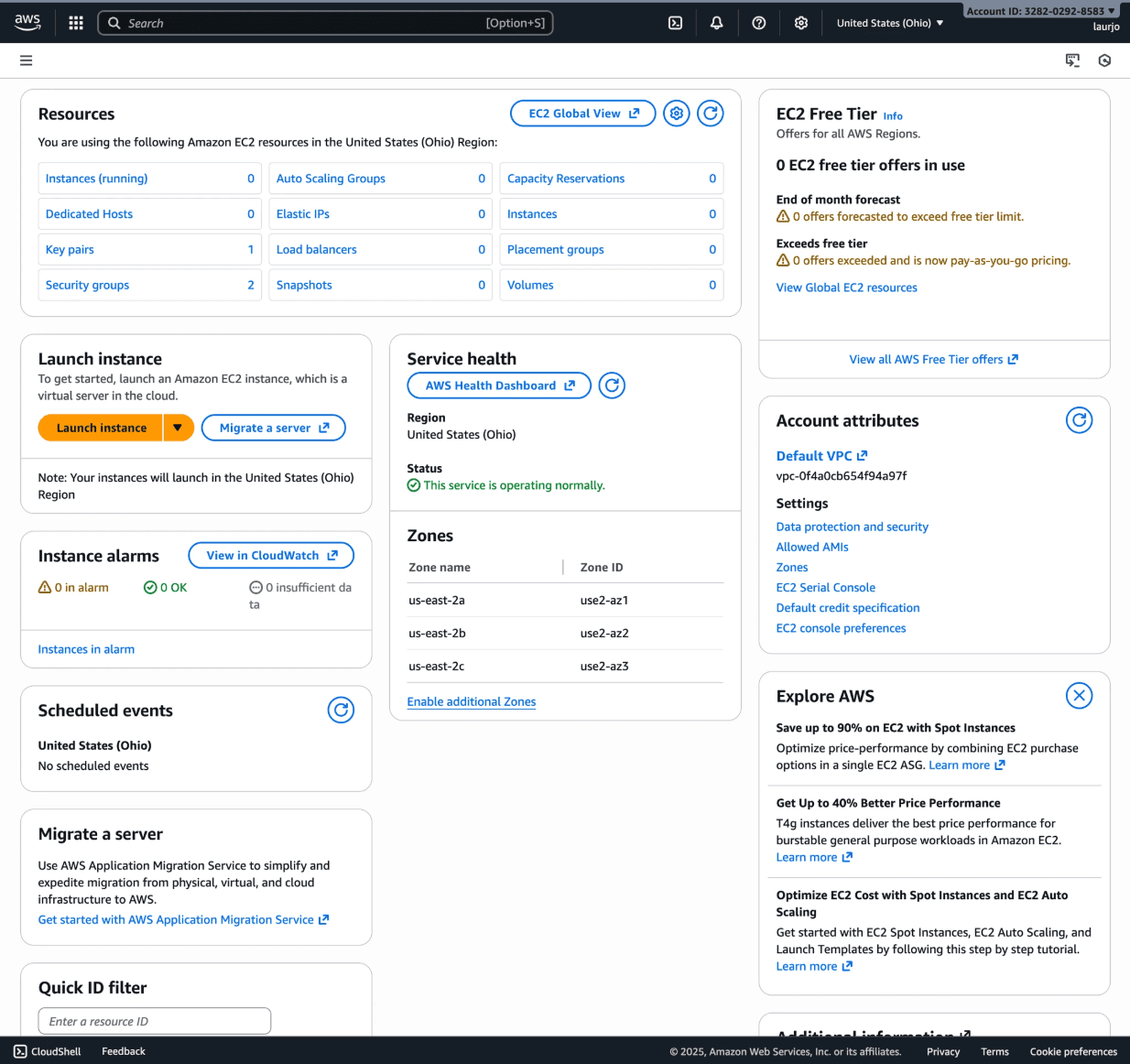
Comparison to Current AWS EC2 Dashboard and Launch Instance Flow
To ground the redesign, I first reviewed the existing AWS EC2 dashboard and Launch Instance flow. While powerful, both surfaces present beginners with dense information, weak visual hierarchy, and technical terminology that make key actions harder to recognize.
1 / 2
Early High-Fidelity Explorations
I explored multiple high-fidelity concepts early in the process to quickly evaluate layout, hierarchy, and visual style. These versions helped me validate what worked, identify friction points, and refine the experience before finalizing the design.
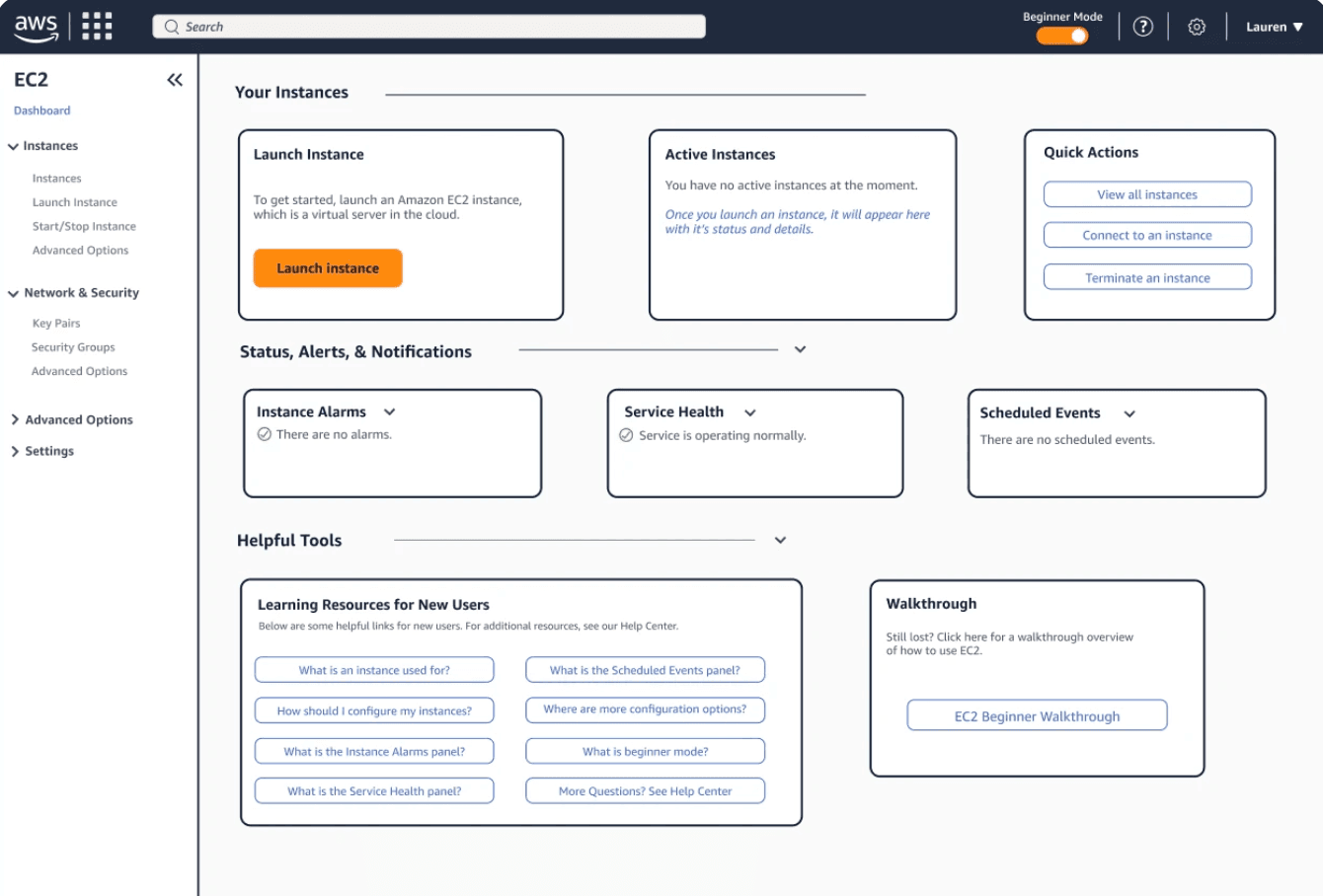

I initially explored designs that stayed close to the existing AWS visual system to better understand the design language and constraints. While this approach was useful early on, feedback showed that elements like low contrast, heavy borders, large unused areas, and a top header with unclear actions still created cognitive load for beginners.
Finalized Visual Design
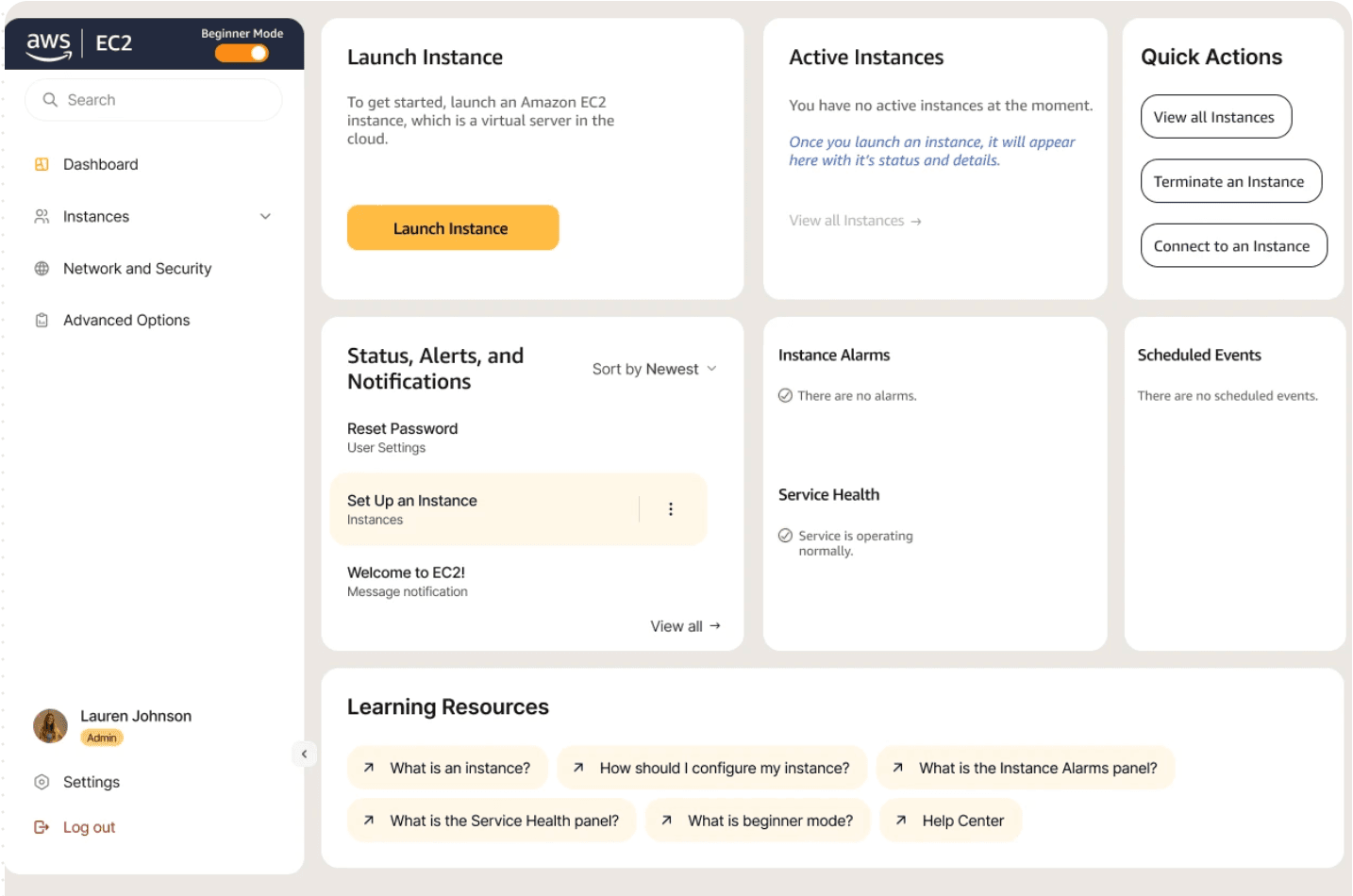
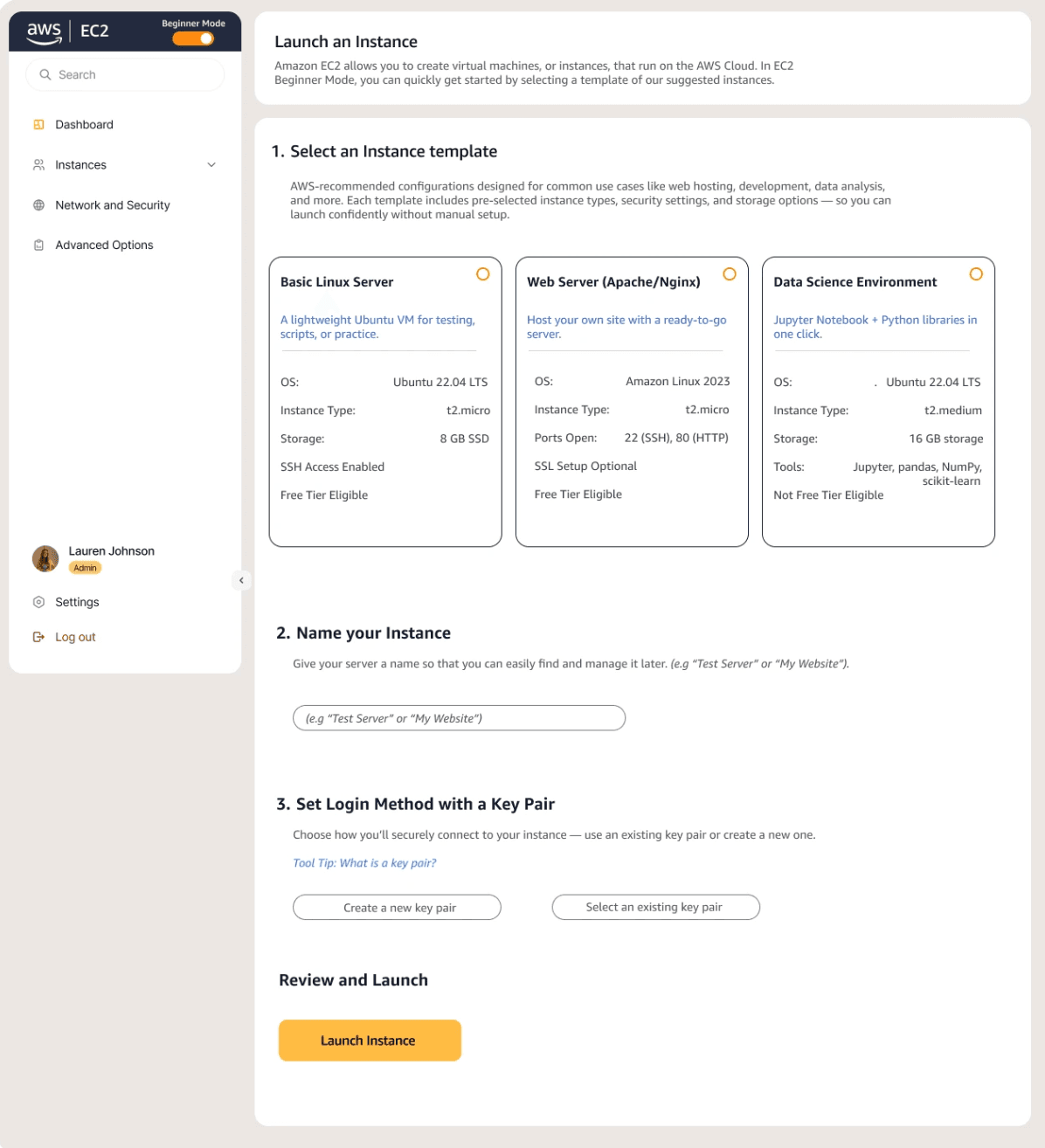
Based on insights from user feedback and previous iterations, I transitioned to a lighter, more streamlined interface that prioritizes clarity, readability, and confidence for new users. I also consolidated the header into the left navigation to reduce redundancy and surface navigation in a more intuitive location.
The Final Feature
The final concept includes a streamlined dashboard with a Beginner Mode toggle and a simplified Launch Instance workflow with guided templates and reduced jargon. Visual hierarchy, contrast, and readability were strengthened to make key actions easier to scan and understand.
07 Outcomes
Outcomes
01
Improved Comprehension
In moderated prototype testing with 4 participants new to EC2, all participants found the Beginner Mode concept easier to understand than the current flow.
02
Errors reduced
Participants made fewer navigation missteps and asked fewer clarification questions while completing the launch task.
08 Takeaways
Takeaways
Designing for a technical domain required deeper product learning before interface exploration.
Understanding EC2's mental model helped me avoid simplifying the wrong things or hiding important setup decisions.
Simplifying complexity meant guiding decisions for beginners without removing expert control.
Beginner Mode works as an optional learning layer rather than a replacement for the full EC2 experience.
Future validation should involve actual EC2 users to test whether the proposed changes reduce friction in real workflows.
The current findings are useful, but deeper testing would better reveal real operational constraints and edge cases.